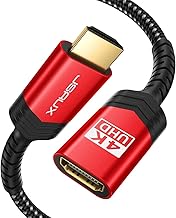
Choosing the right HDMI cables for your projector can significantly enhance your viewing experience. This guide covers essential factors to consider when selecting HDMI cables, ensuring you make the best choice for your setup. From cable lengths to resolution support, understanding these aspects will help you select a cable that meets your needs and enhances your projector's performance.
This guide is aimed at anyone looking to connect a projector to various devices, whether for home cinema, presentations, or gaming. You'll learn about key features such as cable lengths, resolution capabilities, and shielding options. Prices for HDMI cables can vary widely, typically ranging from budget-friendly options to higher-end cables that offer advanced features. By the end of this guide, you'll be equipped with the knowledge to choose the right HDMI cable for your projector.
Determine Your Resolution Needs
Before purchasing an HDMI cable, assess the resolution your projector supports. For 1080p projectors, a standard HDMI cable will suffice, but for 4K projectors, ensure you select a High Speed HDMI cable that supports 4K resolutions at 60Hz for optimal performance.
People Also Look For:
- BlueRigger Dual Shielded Subwoofer Audio RCA Cable with Gold plated connectors -2 Meters
- ARISKEEN Cat 8 Ethernet Cable 10M, High-Speed 40Gbps 2000MHz Network Cable Braided Flat Gigabit Rj45 STP Shielded Internet Network...
- Southlight HDMI 2.1 Cable 3M,8K@60Hz 4K@120Hz Ultra HD Cable High-Speed Lead 48Gbps,7680x4320,Supports eARC HDR10 HDCP 2.2 & 2.3 D...
- BAHIWOM Cat8 Ethernet Cable 1m (5 Pack), 40 Gbit/s 2000 MHz Lan Network Cable Gigabit Patch Cable, Flat Internet Cable Compatible ...
- UGREEN Ethernet Cable 10M, Flat RJ45 LAN Gigabit CAT 6 Network Cable, Pure Copper Core High-Speed 1000Mbps for 250Mhz/s Patch Cord...
Choose the Right Cable Length
Consider the distance between your projector and the source device. HDMI cables are available in various lengths; however, longer cables may require additional considerations like signal degradation. Measure the distance and opt for a cable that accommodates your setup while maintaining signal integrity.
Look for Quality Build and Features
Check for cables with robust construction and features such as gold-plated connectors and high-quality shielding. These features can help prevent interference and ensure a stable connection, especially in environments with multiple electronic devices.
Consider Shielding Options
For environments prone to electromagnetic interference, choose HDMI cables with advanced shielding technologies. Options like A.I.S. shielding can protect against signal loss and ensure a clear picture and sound quality.
Set a Budget
HDMI cables come in a wide range of prices. While it can be tempting to go for the cheapest option, investing in a mid-range cable can provide better performance and durability. Determine your budget and balance cost with quality features that meet your needs.
Check for Return Policies
Before finalizing your purchase, review the return policy of the retailer. This is especially important if you are unsure about compatibility or if you plan to test the cable with your projector setup. A good return policy ensures you can exchange or return the cable if it doesn't meet your expectations.